Training Materials
- What is the MIU?
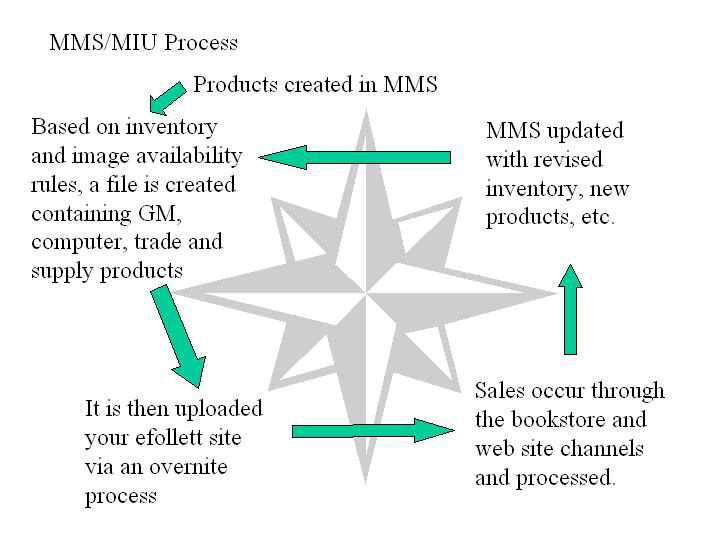
- MIU stands for Mass Information Upload. It is the process by which WinDSS product data is directly integrated into efollett Accelerator. When a PO is created, all of the product information is automatically sent to efollett Accelerator by the MIU.
- Benefits
- The MIU allows us to streamline the process of adding new products to your site. It assures that the SKU, price and availability data is accurately reflecting the correct WinDSS values and that your customers see the most current values on your website.
Apparel and Gifts- The MIU will load new products and SKUs to your site, as well as keeping prices and inventory levels current. It is important that you allow the MIU to refresh the Inventory Status of SKUs on your site. Manually changing these statuses will cause them to fall out of sync with MMS. You no longer will have the ability to change prices on your website as all pricing data will be driven by MMS. Only Apparel and Gifts will require you to make the item visible in Accelerator. After this initial visibility change - you no longer need to make items not visible since the system will automatically manage visibility via inventory status in MMS.
School Supplies and Computer Products- The MIU will load new products and SKUs to your site, as well as keeping prices and inventory levels current. In addition, the MIU also regulates the Visibility status of your products. If you see any irregularities in these products, please do not make any changes yourself - report the irregularity to the Product Support Center.
The Supplies and Computer Products sections of your website operate very similarly to one another. Only stores on the MIU will have this merchandise available to them.
The MIU will load Computer Products and Supply Products and their associated SKUs to your site, as well as keeping prices and inventory levels current. Unlike the General Merchandise section, the MIU will also completely control the visibility of these items. If you are showing a positive on-hand in MMS for an item, it will be visible on your site.
Additions to the Supplies and Computer Products sections are made regularly throughout the year. Because of the unique nature of these two categories, additions cannot be made on a per-store basis.
If you see any irregularities in these products, please do not make any changes yourself - report the irregularity to the Product Support Center.
Trade Books- Like School Supplies and Computer Products, Trade Books are completely automated by the MIU. Trade titles will be fulfilled by your store if WinDSS shows inventory for that title. Otherwise, it will be fulfilled by our trade book partner.
- Vendor Image Process
- On your POs, your GM planner will request digital images of the merchandise she/he is ordering. The product information will immediately be loaded to your site via the MIU process. The delivery time of images to the Online Product team can vary by vendor, but once images are received, they will be processed and added to your website. We will then send you an email that includes instructions on how to find the product(s).
When you have received the product in-store, you should make it visible. Only Apparel and Gifts require you to make the item visible in Accelerator. After this initial visibility change - you no longer need to make items not visible since the system will automatically manage visibility via inventory status in MMS.
Rollout Schedule
Rollout Schedule for Affected Stores (Excel, 153KB)
For each store, the integration process either begins on a Monday and will be completed by end-of-day on Tuesday or begin on a Wednesday and conclude on a Thursday. The rollout schedule includes the completion date for each store. The entire process runs from Tuesday, February 17 through Thursday, April 30, 2009.
Questions?
Contact the Product Support Center.